
Fix the Program
When a cake comes out flat, nobody throws the recipe away; they look for the step that went wrong. Fix the Program does the same with a robot: follow the program until the robot goes off course, find the bad card, then test the whole program again.
Free sets by level, ages 6–10:
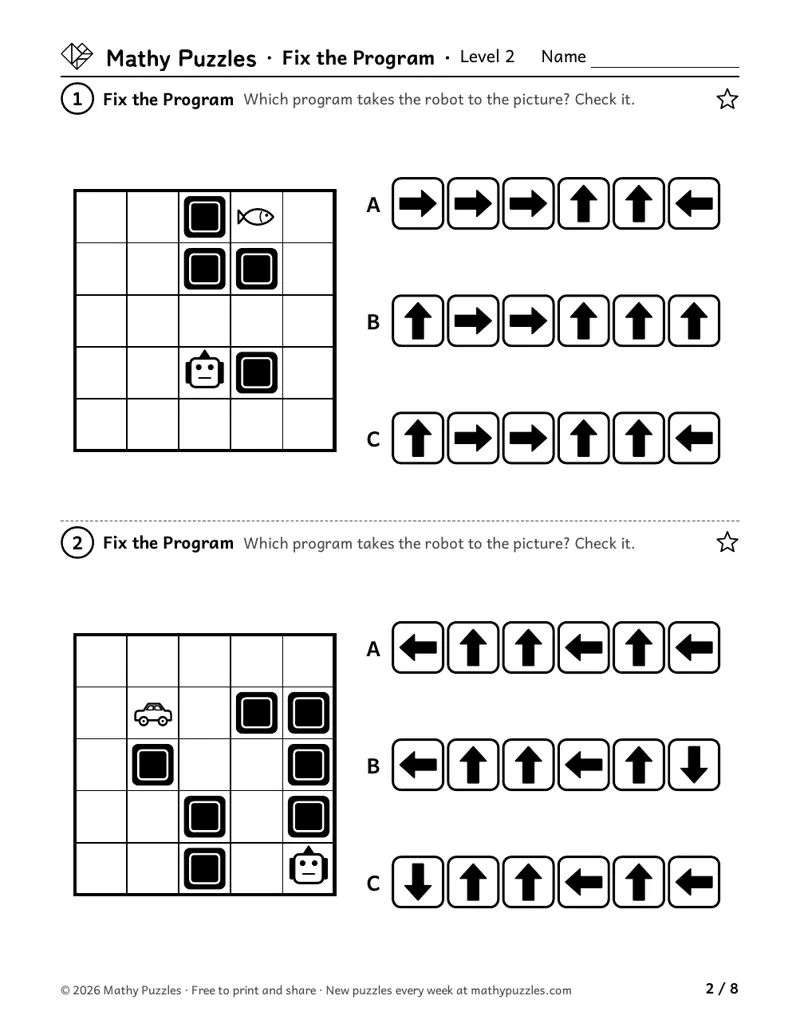 Level 2: a page from the free set
Before starting
- Level 2: follow arrow cards on a grid (Follow the Arrows is a good start)
- Level 3: forward, turn left and turn right cards
- Level 3, harder puzzles: read a repeat box and a named program (F1)
Free puzzles to print
Each set: a Learn sheet with a worked example, 10 puzzles from easiest to hardest, and the answers.
Level 2
Ages 6–8 · Grades 1–2
(arrow cards): first, three programs under one board, and the child checks the one that works. Then one wrong arrow that makes the robot hit a rock or leave the board right where it is. Then a wrong arrow whose effect shows a few cards later, or a missing arrow. The hardest puzzles have an extra arrow, or don't say whether a card is wrong, missing or extra.
On the sheet: “The robot should stop on the picture. One card is wrong. Cross it out and draw the right card.”
Print Level 2 (Letter)Other paper size: A4Level 3
Ages 8–10 · Grades 3–4
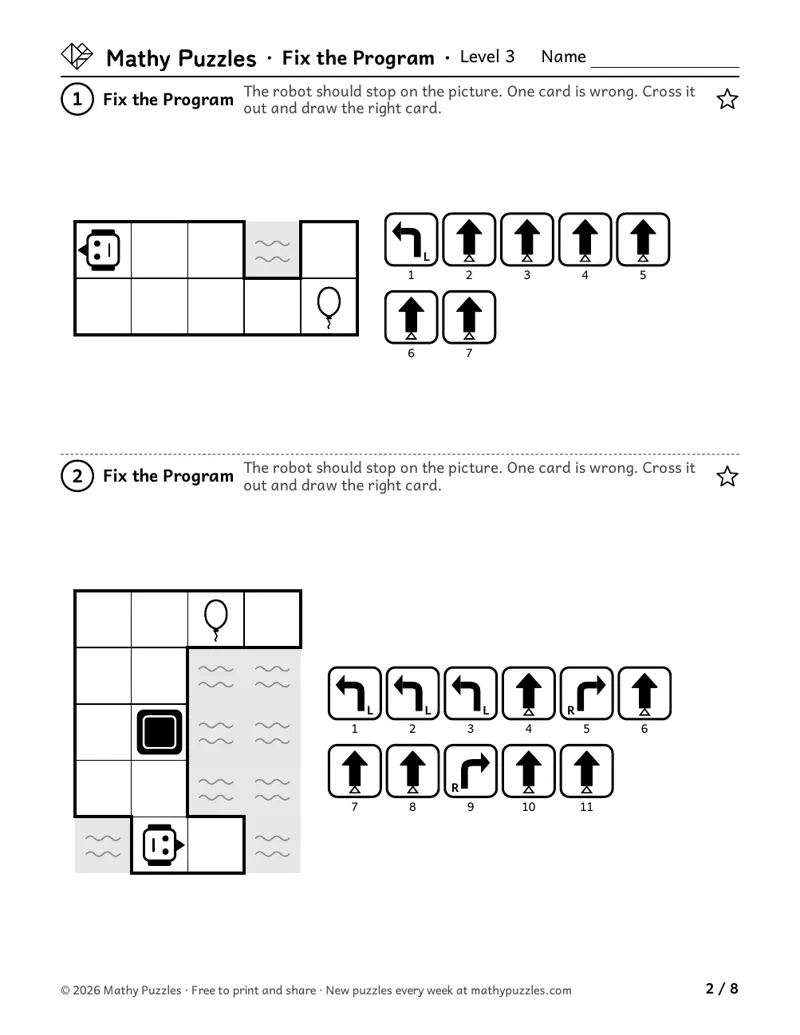
(turn cards on path-shaped boards): one wrong card, then one missing or one extra card. Then the bad card sits inside a repeat box, so it goes wrong every time the box runs. The hardest puzzles add apples to pick up, and the wrong card sits inside F1, a little named program, while MAIN is right.
On the sheet: “The robot should stop on the picture. One card is wrong. Cross it out and draw the right card.”
Print Level 3 (Letter)Other paper size: A4
How it works
The robot's program is printed, but it does not take the robot to the picture. The sheet says what kind of mistake it is: one card is wrong, one is missing, or one is extra. In the hardest Level 2 puzzles, it says only that one card is wrong, missing or extra. The child follows the program until the robot goes off course and finds the bad card. Then the child crosses it out, adds one, or draws the right card.
How to play
- Read what the sheet says: a card is wrong, missing or extra.
- Follow the program with a finger, one card at a time.
- Stop at the first place the robot goes off course: a rock, the edge of the board, or the wrong way.
- Make the one change, then run the whole program again from the robot.
When it gets hard
Changing the card where the robot crashed, when the mistake came earlier.
Hint: Look at the card before the crash too. Did the robot turn the wrong way a step back?
Changing two or three cards until it works.
Hint: The sheet says one card. If you need more changes, go back to the first place it went wrong.
Not testing after the fix.
Hint: Run the whole program again from the start. A change early on moves every step after it.
Tip for grown-ups: Give your child a spoken program with a mistake in it ("three steps, turn left, two steps" to reach the door) and let them find your bug. Children enjoy catching a grown-up's mistake.
Frequently asked questions
- Why not just write a new program?
- Finding the one bad step is a different skill from writing from scratch, and a useful one. The sheet says how many cards to change, so the job is to look closely, not to start over.
- How do I mark a class set quickly?
- Each answer is one changed card (or, in the easiest puzzles, one checked program). The answers show the fixed card, so checking a sheet takes a glance.
- My child changed a different card and the robot still gets there.
- Run it together from the robot, card by card. If the robot really stops on the picture after one change of the kind the sheet asks for, the fix works. The careful re-run is the skill either way.
Questions about printing, levels, answers or membership: see all questions.
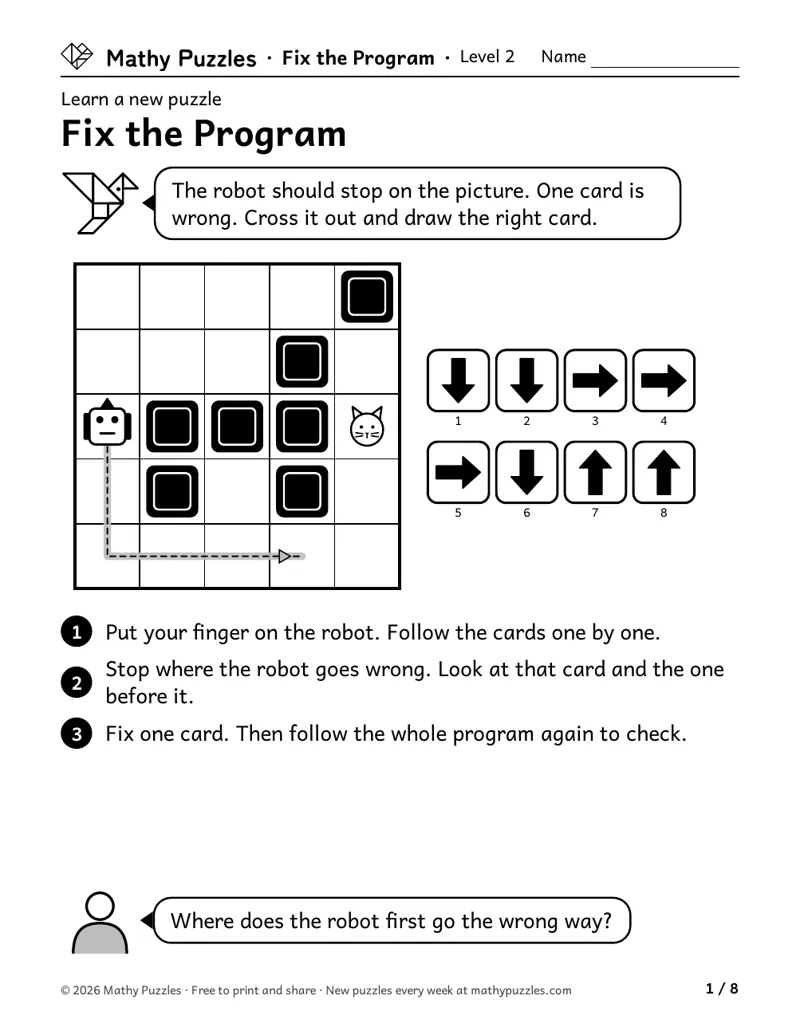
Worked example
From the Level 2 Learn sheet
- Put your finger on the robot. Follow the cards one by one.
- Stop where the robot goes wrong. Look at that card and the one before it.
- Fix one card. Then follow the whole program again to check.
A question to ask: “Where does the robot first go the wrong way?”
Free every Sunday A mixed bag of 20 new puzzles, all four levels. Get them by email
The thinking it works on
Finding the first error
Runs the program until the robot goes off course, then looks there.
Markman (1979) found that children in grades 3 to 6 often said short essays with plain contradictions made sense. They could recall the facts and draw the inferences, but spotting the problem took a deliberate check they did not make on their own. Source
Comparing plan and result
Keeps the goal in mind while watching what the program really does.
Cause and effect at a distance
Sees that a wrong card can do its damage later.
Schlottmann (1999) found that 5- and 7-year-olds expected a cause to be followed at once by its effect. When a bell rang right after a second ball was dropped, they picked that ball as the cause, even when they knew the box worked with a delay. Source
Checking your own work
Runs the fixed program again from the start.
Destan and colleagues (2014) found that 5- to 7-year-olds were more confident in their right answers than their wrong ones. Using that feeling to keep the good answers and drop the bad ones grew stronger with age. Source
Seeing structure in a program
Knows that one bad card in a box goes wrong every time the box runs.
Vourletsis (2026) tested 517 children in grades 1 to 3 on coding ideas and found that questions about loops were harder for them than plain step-by-step sequences. Source
Where is this thinking used?
- Proofreading: Finding the one wrong word that changes a sentence.
- Repairs: Checking each bulb in a string of lights to find the one that's out.
- Baking: Working out which step made the cake sink, so next time only that step changes.
- Programming: Finding and fixing a bug in code by running it step by step.
For teachers
Curriculum areas
- Common Core
- No direct curricular match.
- NCERT
- Maths Mela: following and writing directions on a map (Class 3) and steps on a grid (Class 4)
- Computer science (CSTA)
- Finding and fixing mistakes in programs (algorithms and programming, ages 5–11)
- National Curriculum (England)
- Geometry – position and direction: describing movement and turns (Year 2)
- Cambridge Primary Mathematics
- Geometry and measure: position, direction and movement; turns (Stages 2–3)
Math practices: see the box below.
Math practices this puzzle uses
- Uses: MP1 Make sense of problems and persevere in solving them
- Not used: MP2 Reason abstractly and quantitatively
- Not used: MP3 Construct viable arguments and critique the reasoning of others
- Not used: MP4 Model with mathematics
- Not used: MP5 Use appropriate tools strategically
- Uses: MP6 Attend to precision
- Not used: MP7 Look for and make use of structure
- Not used: MP8 Look for and express regularity in repeated reasoning
From the Common Core Standards for Mathematical Practice.
More Fix the Program puzzles for members
Members get at least 5 more worksheets at each difficulty for every puzzle, 80 new puzzles every Sunday, and the whole archive. $39 a year or $25 for 6 months.
See membershipNot ready yet?
One email, all four levels: 20 puzzles, 5 for each level.
For grown-ups (18+). One email every Sunday with the puzzles and the odd note about membership; unsubscribe any time. We never ask about your child. How we use your email