
Count and Stop
Ask a child to clap until you say stop and they just keep going; ask them to clap three times and they have to count. A program can do both: keep a count as it runs, and use that count to decide when to stop.
Free sets by level, ages 10–12:
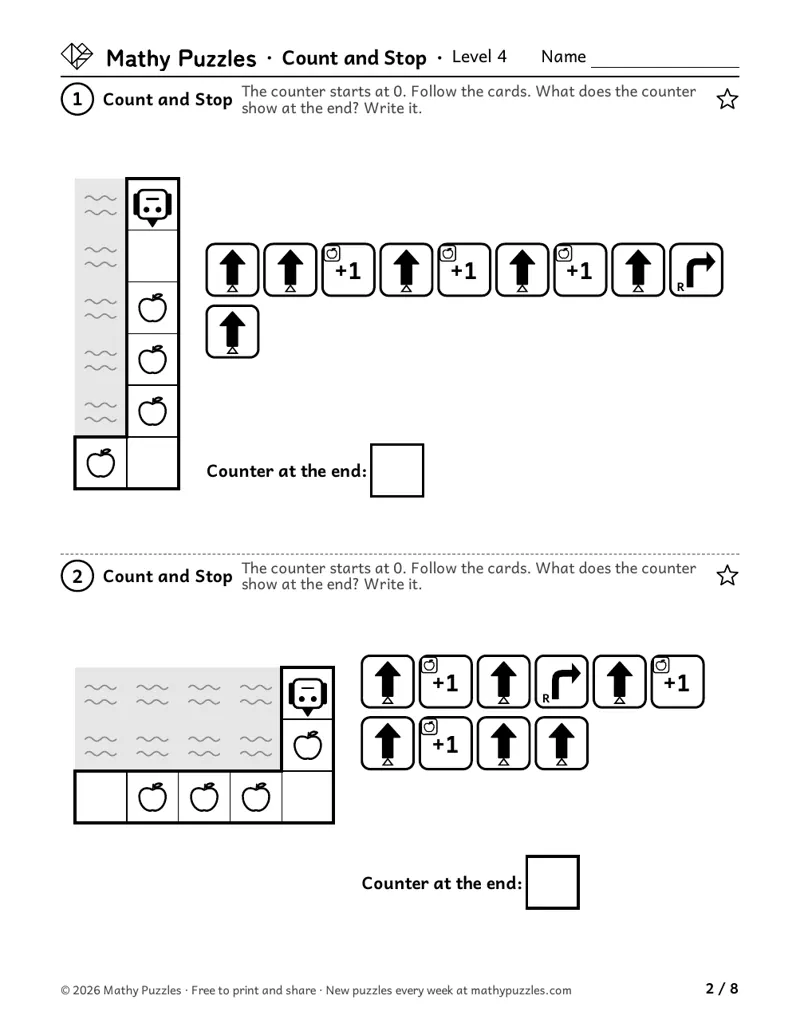 Level 4: a page from the free set
Before starting
- Forward, turn left and turn right cards
- Counting to 10
- Cards that work only on certain squares (Robo Tricks helps)
Free puzzles to print
Each set: a Learn sheet with a worked example, 10 puzzles from easiest to hardest, and the answers.
Level 4
Ages 10–12 · Grades 5–6
The easiest puzzles: follow the cards and write what the counter shows at the end. Some apples are passed while no '+1' card runs.
Next: find where the robot stops when an 'until' box runs to a number. Turns are made by a card that works only on dotted squares.
Then: fill in the number and two cards so the robot stops on the picture.
The hardest puzzles put a repeat box inside the 'until' box and leave both numbers and one card blank. The robot hops several squares at a time and counts only the apples it lands on.
On the sheet: “The counter starts at 0. Follow the cards. What does the counter show at the end? Write it.”
Print Level 4 (Letter)Other paper size: A4
How it works
The robot carries a counter that starts at 0. A '+1' card with an apple tab adds one, but only when the robot is standing on an apple. An 'until' box repeats its cards until the counter reaches its number. The child follows the program and keeps count, then writes what the counter shows, checks where the robot stops, or fills in the missing number and cards.
How to play
- Write 0 for the counter.
- Follow the cards one at a time. A '+1' card adds 1 only on an apple square.
- In an 'until' box, run all the cards, then look at the counter. Not at the number yet? Run the box again.
- Write the counter, or check the square where the robot stops.
When it gets hard
Counting every apple the robot passes.
Hint: Only a '+1' card adds 1, and only when the robot is standing on an apple at that moment.
Running the 'until' box one time too many, or stopping halfway through a pass.
Hint: Finish the pass, then check the counter. If it shows the number, the box is done; if not, go again.
In the hardest puzzles, counting apples the robot hops over.
Hint: The robot counts only the squares it lands on. Mark each landing square.
Tip for grown-ups: Keep the count out loud for the first puzzle and pause before each '+1' card: "Are we on an apple?" Then hand the counting over.
Frequently asked questions
- What is an 'until' box?
- A repeat box with a stopping rule. Instead of "do this 3 times", it says "keep going until the counter shows 3". The box may run more times than its number, because not every pass lands on an apple.
- Can my grade 5 class work on this in pairs?
- Yes. One child moves the robot and the other keeps the counter, then they swap. Saying each '+1' card out loud helps both see when it counts.
- Why isn't the answer just the number of apples?
- Some apples are passed while no '+1' card is running, so they don't count. That is the point of the first puzzles: count what the program does, not what you see.
Questions about printing, levels, answers or membership: see all questions.
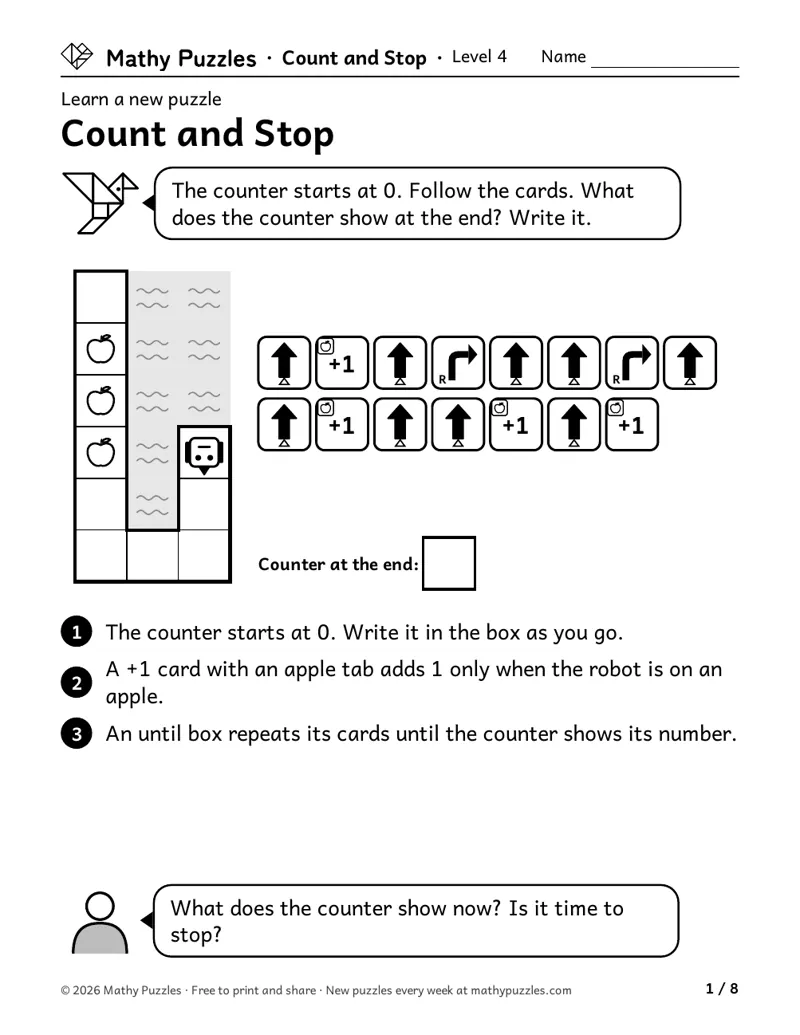
Worked example
From the Level 4 Learn sheet
- The counter starts at 0. Write it in the box as you go.
- A +1 card with an apple tab adds 1 only when the robot is on an apple.
- An until box repeats its cards until the counter shows its number.
A question to ask: “What does the counter show now? Is it time to stop?”
Free every Sunday A mixed bag of 20 new puzzles, all four levels. Get them by email
The thinking it works on
Updating a number
Changes the counter each time a '+1' card runs.
Lee, Ng and Ng (2009) tested 255 eleven-year-olds on memory tasks, including keeping a running count and keeping track of changing items. These scores explained about a quarter of the differences in how well the children set up and solved word problems. Source
Counting only when a condition holds
Adds 1 only when the robot is on an apple.
Grover and Basu (2017) studied 100 middle schoolers (grades 6 to 8) who had finished a first programming course. The students still held mistaken ideas about variables, about how loops run, and about how 'and' and 'or' conditions work. Source
Knowing when to stop
Checks the counter at the end of each pass and stops when it shows the number.
Tracking two things at once
Keeps the robot's place and the count in mind together.
Working backward from the goal
Works out the missing number from where the robot must stop.
Where is this thinking used?
- Sports: Keeping score and knowing when a game ends at a set number of points.
- Cooking: Adding scoops one at a time until you reach the number in the recipe.
- Shopping: Filling a bag until you have five apples, and only counting the good ones.
- Programming: A counter in code and a loop that stops when it reaches a number.
For teachers
Curriculum areas
- Common Core
- No direct curricular match.
- NCERT
- No direct curricular match.
- Computer science (CSTA)
- Programs with loops, a condition and a counter that changes (algorithms and programming, ages 8–11)
- National Curriculum (England)
- No direct curricular match.
- Cambridge Primary Mathematics
- No direct curricular match.
Math practices: see the box below.
Math practices this puzzle uses
- Uses: MP1 Make sense of problems and persevere in solving them
- Not used: MP2 Reason abstractly and quantitatively
- Not used: MP3 Construct viable arguments and critique the reasoning of others
- Not used: MP4 Model with mathematics
- Not used: MP5 Use appropriate tools strategically
- Uses: MP6 Attend to precision
- Not used: MP7 Look for and make use of structure
- Not used: MP8 Look for and express regularity in repeated reasoning
From the Common Core Standards for Mathematical Practice.
More Count and Stop puzzles for members
Members get at least 5 more worksheets at each difficulty for every puzzle, 80 new puzzles every Sunday, and the whole archive. $39 a year or $25 for 6 months.
See membershipNot ready yet?
One email, all four levels: 20 puzzles, 5 for each level.
For grown-ups (18+). One email every Sunday with the puzzles and the odd note about membership; unsubscribe any time. We never ask about your child. How we use your email